Showing posts with label Techno review. Show all posts

Saturday, May 16, 2020

Kulkas SHARP 2 Pintu SJ 237 ND Review


Sharp SJ 237 ND

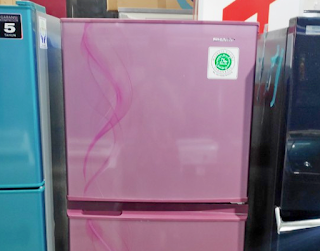
Kulkas sharp sj 237nd adalah seri kulkas 2 pintu tanpa bunga es yang berukuran bersih 187 liter dengan 55 liter di bagian freezer dan 132 liter di bagian chiller. Hal yang menarik dari kulkas ini adalah listriknya yang hanya memakan konsumsi daya listrik 100 watt saja. Jika dikalkulasi angkatan saat menyalakan 2kali lipat, maka sharp sj 237nd ini kuat di listrik dengan daya 450 va.

Spesifikasi Sharp SJ 237ND

Dari desain terdapat garis garis motif di bagian pintunya dan tersedia 3 warna yaitu pink, biru dan abu abu. sharp sj 237nd tidak memiliki handle, ada lekukan sedikit diantara chiller dan freezer yang digunakan untuk membuka pintu, selain itu, kapasitas freezer yang cukup besar menjadikan nilai plus untuk kulkas sharp sj 237nd ini, anda bisa membuat es batu dan menyimpan makanan di reezer dengan jumlah yang lebih banyak daripada kulkas lainya. Di bagian dalam freezer terdapat ice twist tray yang memudahkan anda untuk membuat es batu, hanya tinggal isi air dan mengambilnya pun hanya diputar.
kulkas sharp

Di bagian chiller terdapat 3 rak, satu tempat untuk daging dan satu tempat untuk sayur dan buah, selain itu di bagian chiller juga dilengkapi dengan nano deodorizer yang menyerap bau, sehingga bau makanan tidak menyebar ke bahan makanan lainya. Oh ya, raknya terbuat dari tempered glass, jadi aman dan tidak mudah pecah.

Harga Kulkas Sharp 2 Pintu SJ 237 ND

sharp sj 237nd ini sudah memiliki sertiikat halal dari MUI, selain itu garansinya juga panjang, yaitu 5 tahun garansi. Anda bisa membeli kulkas ini dengan harga 2,7 juta saja, cukup murah untuk kulkas 2 pintu dengan merk terkenal.

Ada satu tips dari pengalaman para pengguna, jika anda ingin menggunakan kulkas ini anda harus menyiapkan colokan listrik khusus untuk kulkas dan tidak boleh dicabang dengan yang lain, dan colokanya harus dari kabel utama rumah dan wajib memakai kabel kawat bukan serabut, biasanya jika tidak seperti itu kulkas hanya akan dingin sebagian saja, karena voltase menurun, ya memang listriknya irit, tapi harus seperti itu cara pasangnya,

Wednesday, July 3, 2019

Dell XPS 13 9380 (2019) Review


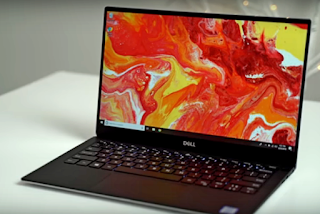
Is the new Dell XPS 13 an excellent laptop overall? And what changed sinced last year? Dell has just updated their XPS 13 laptop for 2019, and we got an entry level i5 model for $1,150. which is a great price considering it packs of 8GB of RAM and 256GB of NVME SSD storage. So lets go through everything you need to know about it. Just like last year, its encased in an aluminum shell that looks and feels great, compared to many other windows laptops. The display has very thin great-looking bezels despite the fact that they've moved the webcam back up above the display. Last year model has the webcam under the display to accommodate Windows Hello, a useful feature that scans your face to log in without having to enter your password. That feature is now gone. But it's not a big deal since the power button doubles as a fingerprint scanner for logging in.
Dell XPS 13

The display itself uses a 1080p panel that definitely isn't the sharpest display out there. But the excellent color accuracy in the matte filter make it one of the better 1080p displays you can find. But either way if you care a lot about the display, we'd recommend upgrading to the 4k model for a few hundred dollars more. The keyboard feels pretty decent for a windows laptop, with good amount of key travel. Typing is pretty comfortable, but some users did complain that there was a bit too much spacing between the keys.

Is Dell XPS 13 a Good Laptop?


Personally we prefers the latest MacBook Pro Keys, which are wider and more clicky. But most people prefers the Dells. It also features backlighting with two brightness setting, so it's great for using at night. The build quality is really solid, and doesn't flex like other cheaper Windows laptop do. One thing we can complain about, is that there's no notch in the front to help open the laptop. So you kind of have to jam your finger nail in to open it up. The hinge itself, is pretty stiff so it's tough to open with one hand. The trackpad is also pretty good for a Windows laptop, but you definitely won't get the same experience as with one of the newer Macbooks, which feature the best trackpad in the business. But the XPS 13 trackpad is still above average.
Dell XPS 13

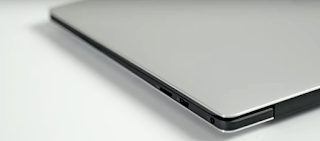
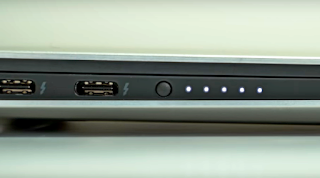
One thing that really stands out about the XPS 13, is that it packs a total of three full speed USB C Ports, with two of them supporting full speed Thunderbolt 3. a lot of Windows laptop only come with one full speed Thunderbolt 3 port or two slower ones, so having two full speeds ports is impressive. It also packs a mini SD card slot, a headphone in, a neat little battery indicator that shows you your current battery.

One thing that still disappoints us, year-over-year is the speaker quality. Its sounds ok but it definitely lacks volume in a wide range of frequency reproduction. A few years ago, these types of speakers were the norm. but many windows Laptops have been making big improvements. The 720p webcam actually isn't too bad, using noise reduction to make for a clearer, but not a sharp image. The microphone quality was really terrible.

How Long Does the Dell XPS 13 Battery last?


The Plus side, battery life is also really impressive compared last year, but that's using the default battery saving settings. If you leave it on these settings, you'll get decent performance similar to the base 13 inch dual-core Macbook Pro, which is not what you expect from its i5 Quadcore Processor. If you turn on best performance mode, you'll gain a lot of extra processing power. We saw the same result s for the graphics as well. Compared the last year, we're getting a ton of graphics performance. This is probably one of the biggest standout features of the laptop. It's really powerful for the price, so can handle things like entry-level video or photo editing really well, even simple 4k video editing.
Dell XPS 13

However we're a bit disappointed with the NVME storage speed. It's not too bad, but we really hope it'll speed up next year. Either way, if you someone who's looking for a good quality laptop with a great performance for around the $1000 range, the Dell XPS 13 is a good choice. It's a great laptop overall with only a couple of downside that many regular users may not mind. At a price of just $1150 it's really good value, but if you will be using the soft top in a bright environment or watching a lot of video content and music, you might want to look elsewhere.

Huawei mate book X Pro would be a good alternative, but everything that's been going on with Huawei recently, it's a tough sell. If you've got some extra cash, definitely look into the 4k model of the XPS 13, or maybe even one of the higher-end XPS 15 model, which packs dedicated graphics in 6 core processors. If you're also considering buying an Apple Macbook, you should definitely check out the comparison between the XPS 13 and the base 13 inch Macbook Pro.
Friday, June 28, 2019

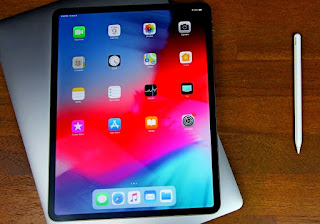
The iPad Pro Review After iPad OS 13


Lets discuss all the awesome new changes coming with iPad OS, that allows you to replace your laptop. First off, getting USB-C on this iPad Pro didn't really mean much since it was so limited. Now allowing you to connect external drives, but now we finally have external store support that work really well. You can connect anything from a flash drive to a hard drive or SD Card and transfer various types of file to the iPad local storage folder. You can even connect multiple drives at once and transfer files between them.You can zip and unzip files and folders. And if you use split view, you can drag and drop direcltly from a hard drive to an app like Bloom effusion. And it'll all work without importing the file to camera roll or the iPads local storage.
The iPad Pro Review

There's actually a big list of iPads that support iPad at west, but the 2018 ipad pro and it's USB C port is the way to go for external storage support. The old lightning port isn't able to supply enough power to be able to drive various storage drive. So it requires a special camera kit adapter which plugs into power. And even then some drives still won't work so the convenience of USB C is well worth it on the iPad pro.

One thing that's pretty amazing is SMB service of port which works incredibly well. Allowing you to connect two hard drives or servers over a Wifi connection. You can now open multiple instances of the same app in split view. Like two notes app or two files apps, to make transferring files easier. And it even work with third party apps that support. Is there's also a bunch of new multitasking features and gestures that make the iPad much easier to use. Like easier ways to select text. And finally an undo gesture that doesn't require you to shake your iPad.

Safari has seen some awesome new updates like automatic desktop mode that's optimized for touch. And there's a new download manager, similar to what you get on the Mac. In the setting, you can easily change the download location to wherever you want. We were even able to download a powerpoint file from Google, and edit it using Keno. Perhaps the best part is that iPad OS is getting exactly the same physical keyboard shortcuts that were already used to on Mac OS. Both for use within safari and basically everywhere else on the iPad. So making the switch is much easier. And if you're using the on-screen keyboard, you'll be able to pinch it to shrink it down and move it anywhere you'd like as well as use the new swipe keyboard, which works incredibly well. It's even better for Apple pencil users. Input latency has been reduced from an industry-leading 20 ms, to a very impressive 9ms. There's also a new tool palette which can be easily moved around, so it doesn't get in your way. And it's much easier to mark up a page distract from the corner of the screen using the Apple pencil. From here you can mark it up and share it or tap the full page button at the top to be able to scroll through the entire page. And you can even grab the scroll bar and scroll up and down without having a swipe. 

Apple has finally added bluetooth mouse support, but you don't actually get a cursor like you do on the Mac. You're basically just moving your finger around and clicking the mouse to perform a touch gesture, so it's not the best solution. However it does fix a huge issue with external monitor mirroring. Before if you use an external display, you still have to touch the iPad to navigate. But now you can use a bluetooth mouse and key board and set your iPad to the side. Not only that, but if you have a Mac running Mac OS Catalina, you can use the iPad as a secondary display. To do things like wirelessly draw directly into the full Mac OS Photoshop app using the iPad. On top of that the iPad pro outperforms the rest of Apple's latest iPad line up, by massive margin. So you're gonna have no performance issues and basically any app or game you try out.

I previously stated that people should just buy the 2019 iPad air, because the iPad pro performance was so limited due to software. But i've completely changed my mind now that iPad OS is coming out. Having USB C in in this level of performance, guarantees the best possible support for apps and features for years to come. And it's unique design, awesome quad speakers, and the new Apple pencil make it feel unique and special compared to the other iPads. I'd have to say that paying only $700 with prime shipping for this iPad pro. Or even $900 for the 256 gig model is well worth the price. Especially for trying to replace a much more expensive laptop. I definitely recommend anyone looking at the 2019 iPad air 2, just save some more cash and buy the iPad pro. Because with iPad OS, it's finally become what Apple has envisioned to be.